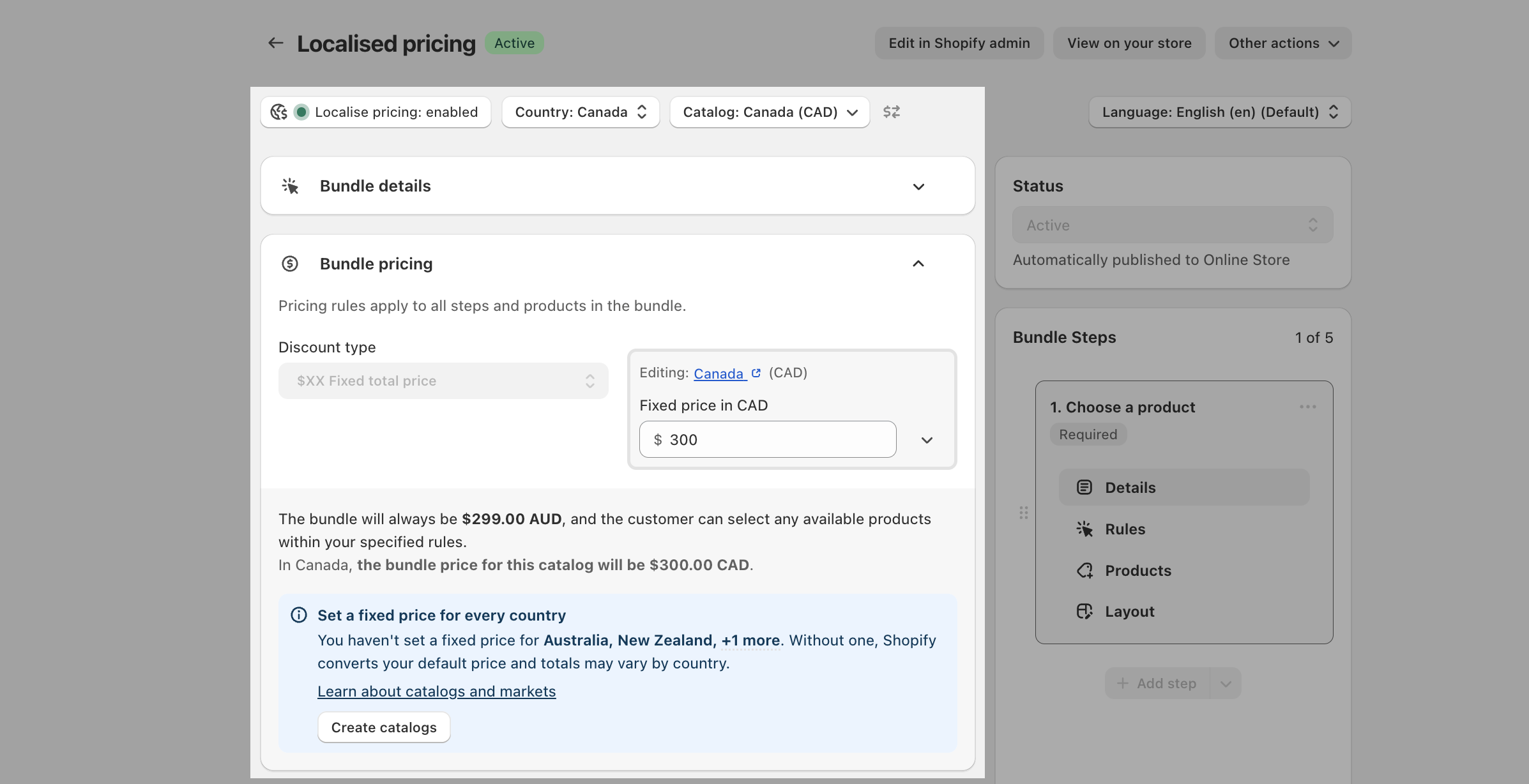
Localised bundles give you control of your bundle's price in every market you sell in, instead of letting your store's home price convert automatically with the exchange rate.
There are two kinds of localised bundles:
Fixed total price bundles. You set the exact bundle price per catalog, in each market's own currency.
All other discount types. The bundle price in each market is built from the local prices of the component products, minus your discount. The app keeps the bundle product's displayed price matched to that total.
This guide covers both, and the concepts you need from Shopify to use them well.
Customers who build a bundle on your store pay the current local prices of the component products, minus your discount. The app keeps the bundle product's displayed price matched to that total. On fixed total price bundles, the price you set per catalog is exactly what customers in that market pay.
Before you localise a bundle, create a catalog for every market you sell in and set fixed prices in it, at least for the bundle's default components. That is what lets the app calculate an accurate display price for your bundle in each catalog and keep it there. The rest of this guide explains what you see in the admin, and the small cases where prices can differ.
Localised bundles are built on Shopify's own market pricing tools. Four ideas do most of the work:
Markets. A market is a country or group of countries you sell to, with its own currency and settings. Manage them in Shopify admin under Settings, then Markets. See Shopify's guide to managing markets.
Catalogs. A catalog (also called a price list) attaches to a market and holds prices for that market. Catalogs are where localised bundle prices live. See Shopify's guide to catalogs for markets.
Fixed prices in a catalog. Inside a catalog you can give any product a fixed price in the market's currency. A fixed price does not follow the exchange rate and is never rounded by Shopify. Products without a fixed price are converted from your home price with the live exchange rate, which is convenient but imprecise. Localised bundles work best on fixed prices. See Shopify's guide to setting product prices by country.
Default components. Every bundle has a default selection of components. They are what a customer receives when the bundle is added to the cart without choices, and the bundle product's own price in each market is built from them. See Default components for the full picture.
More than one Shopify Market, or an extra language. Localise pricing stays switched off on single market stores.
A plan that includes localised pricing. If the option is locked, open the app's Billing page to review plans.
A supported discount type. Every discount type works except volume discounts set to fixed prices. Fixed total price bundles use the fixed price flow described below; every other type builds the price from components.
Catalogs with fixed prices, covered next. This is the real first step.
Do this before you turn localised pricing on.
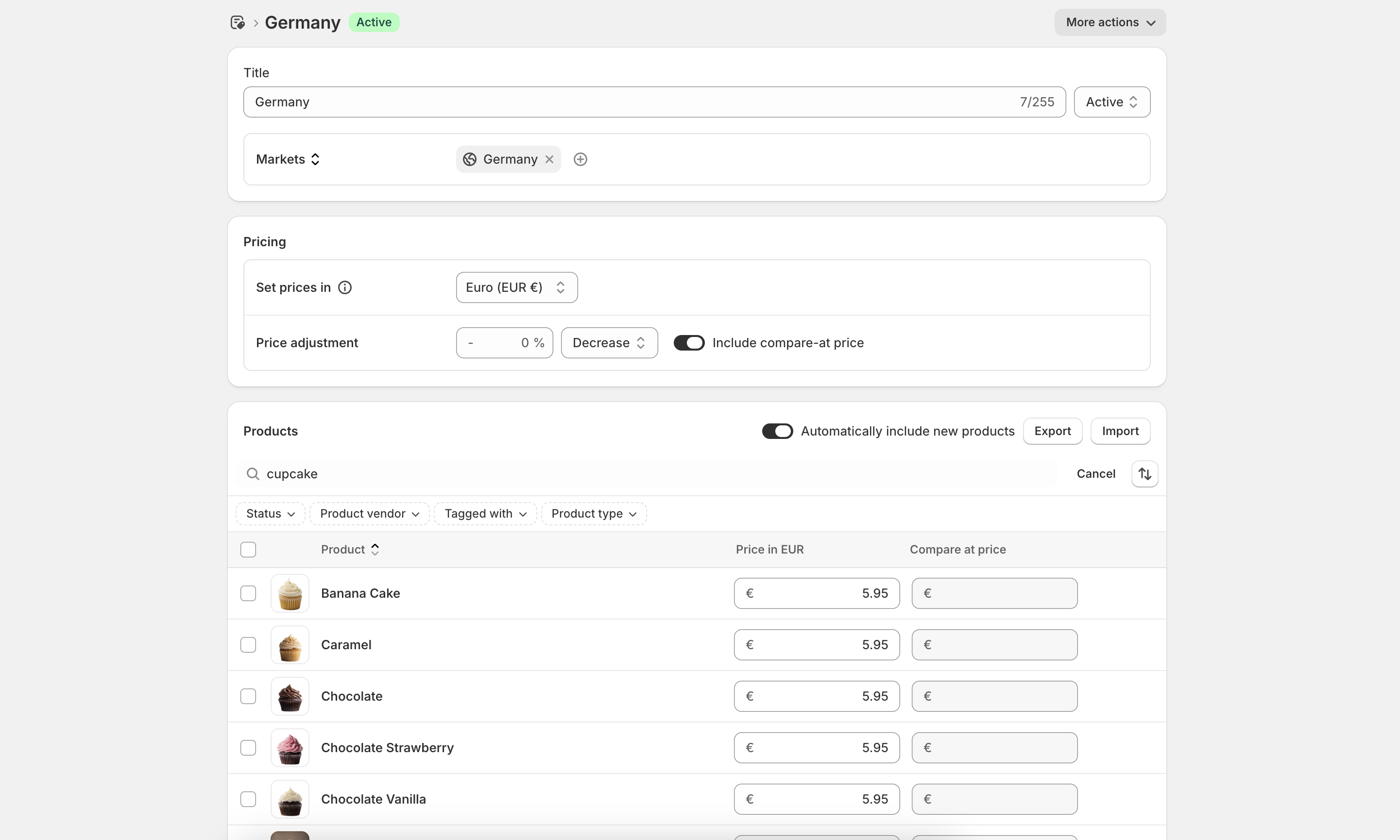
Create a catalog for every market you sell in. A catalog is where a market's prices live. For fixed total price bundles it is where your bundle's price goes; for every other discount type it is where the app maintains the bundle's price. See Shopify's guide to catalogs for markets.
Set fixed prices in each catalog, at least for the bundle's default components. A fixed price does not follow the exchange rate and is never rounded by Shopify, so the app can calculate the bundle's display price for that market accurately and keep it up to date. See Shopify's guide to setting product prices by country.
We recommend fixed prices over relying on Shopify's dynamic conversions. Without them, every price is converted with the live exchange rate and rounded on its own, so the bundle's displayed price can drift from the total of its components as rates move. Everything still works, and customers always pay the correct total at checkout, but the prices shown in that market are estimates rather than numbers you chose.
Open your bundle in the Biscuits Bundles app. Create and save the bundle first if it is new.
Select Localise pricing in the bundle editor.
Review the information in the dialog and select Enable.
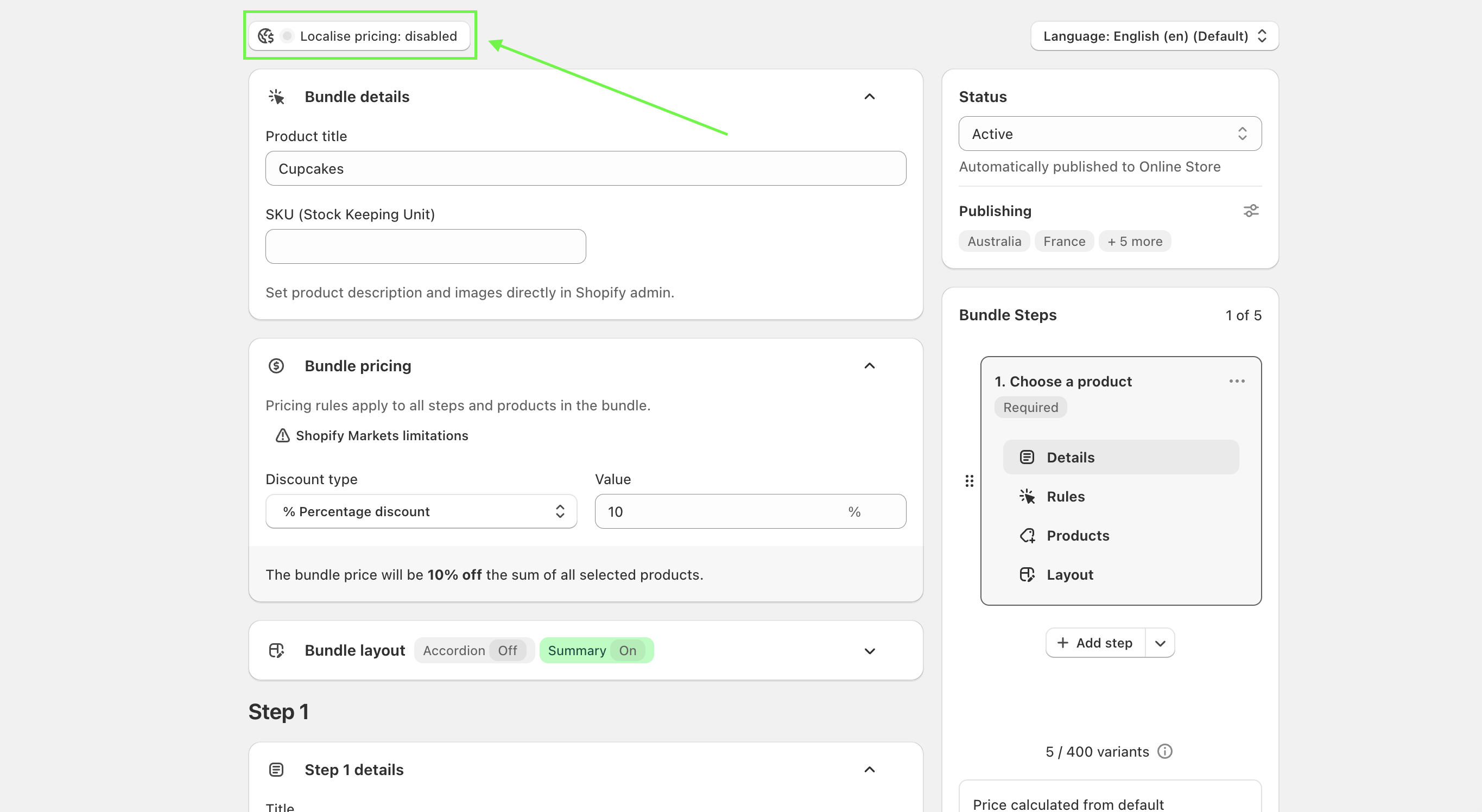
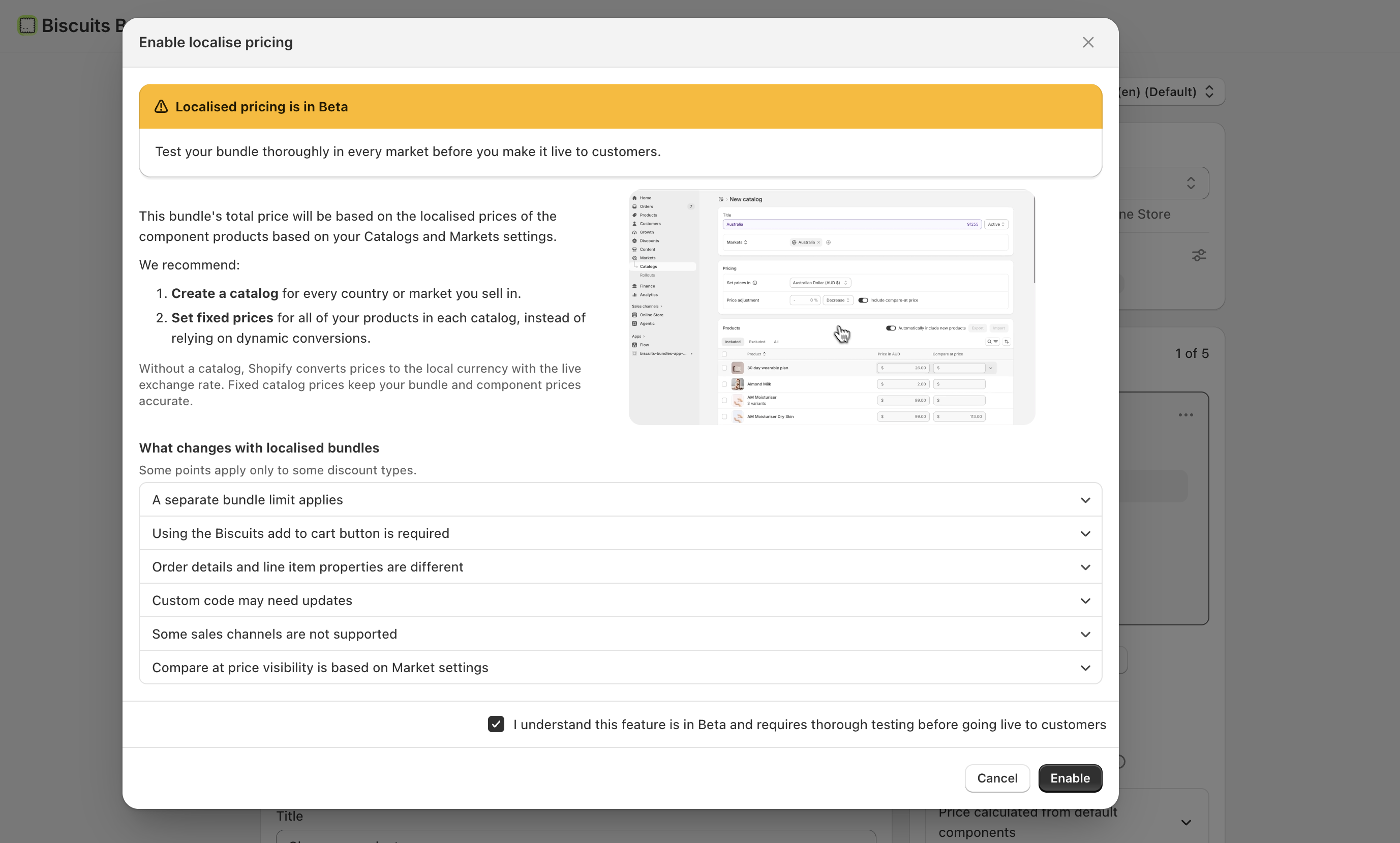
You can reread everything in the enable dialog later: open the price source details in the bundle editor and select Important info about localised pricing.
Localised bundles work differently behind the scenes, so a few things change. Some points apply only to some discount types.
The Biscuits add to cart button is required. It appears on the bundle automatically, and the theme's own button and express checkout buttons are hidden on the bundle page. If your theme has custom code that hides the Biscuits button, the bundle will not work.
Some sales channels are not supported. Localised bundles do not support subscriptions or POS. Bundles added through shared links, draft orders, or the API are charged at the default components' price, not the products the customer chose.
Publishing matters. Publish the bundle and its default components in every market you sell in. Only product level publishing is supported; variant publishing settings are ignored.
Order details are different. Each component product appears as its own line on the order, with a reference to the bundle group. The bundle name comes from Shopify's built-in group title. Custom line item properties from the bundle page still pass through if the relevant setting is on, but extra properties from the Settings page, like the cart compare-at price display workaround, are not supported. See Identifying bundle components on the final order.
Custom code may need updates. The add to cart request and its properties are different for localised bundles, so custom code or apps that read the old properties may not work as expected.
Compare-at visibility follows Market settings. Markets that hide compare-at prices, or catalogs that do not include them, will not display compare-at prices for the bundle or its components.
A separate bundle limit applies. Most stores can create about 80 localised bundles. This limit is separate from your plan's bundle limit and cannot be increased, and the app warns you as you get close. It applies to all discount types except fixed total price.
This section applies to every discount type except fixed total price.
When someone views your bundle in another market, its price comes from one of two places:
Converted automatically by Shopify. If no component product has a fixed catalog price in that market, Shopify converts every price with the live exchange rate on the storefront. Shopify rounds each component product's price on its own, so the bundle product's displayed price can differ from the total of the component products a customer selects. There is nothing to set up. To remove the difference, give every component product a fixed price in that market's catalog.
Managed automatically by the app. When you give a default component product a fixed price in a market's catalog, that product stops following the exchange rate. To keep the bundle price matching its contents, the app writes a fixed bundle price into that catalog. We call this a pinned price. The app keeps it up to date.
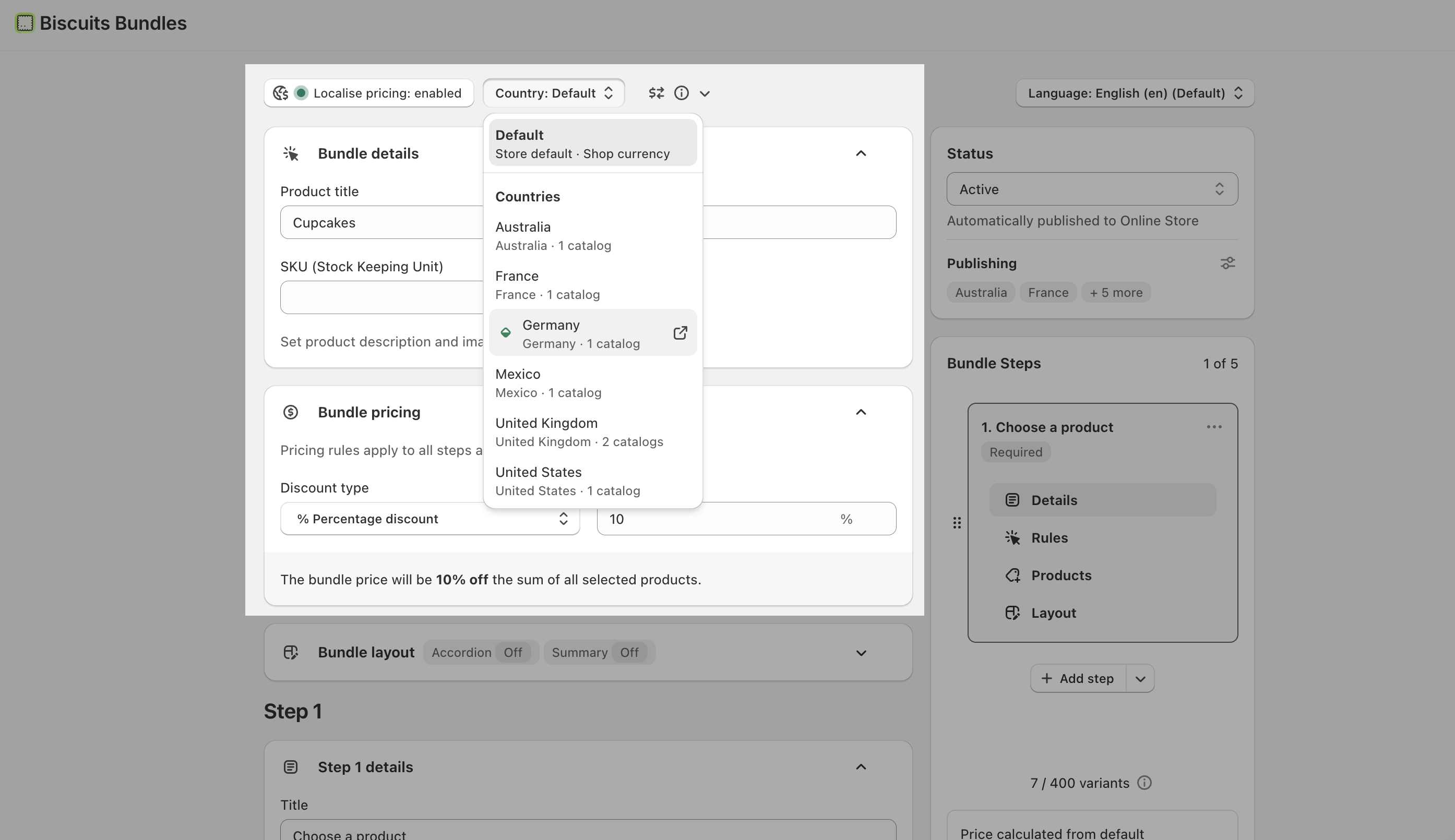
To see which applies, switch to a market with the country selector in the bundle editor. The note under the Total says "Updated automatically from component prices" when the app maintains the price, "Estimated, converted by Shopify" when Shopify converts it, or "Save to lock in the price for this market" when every component is fixed and one save will pin it.
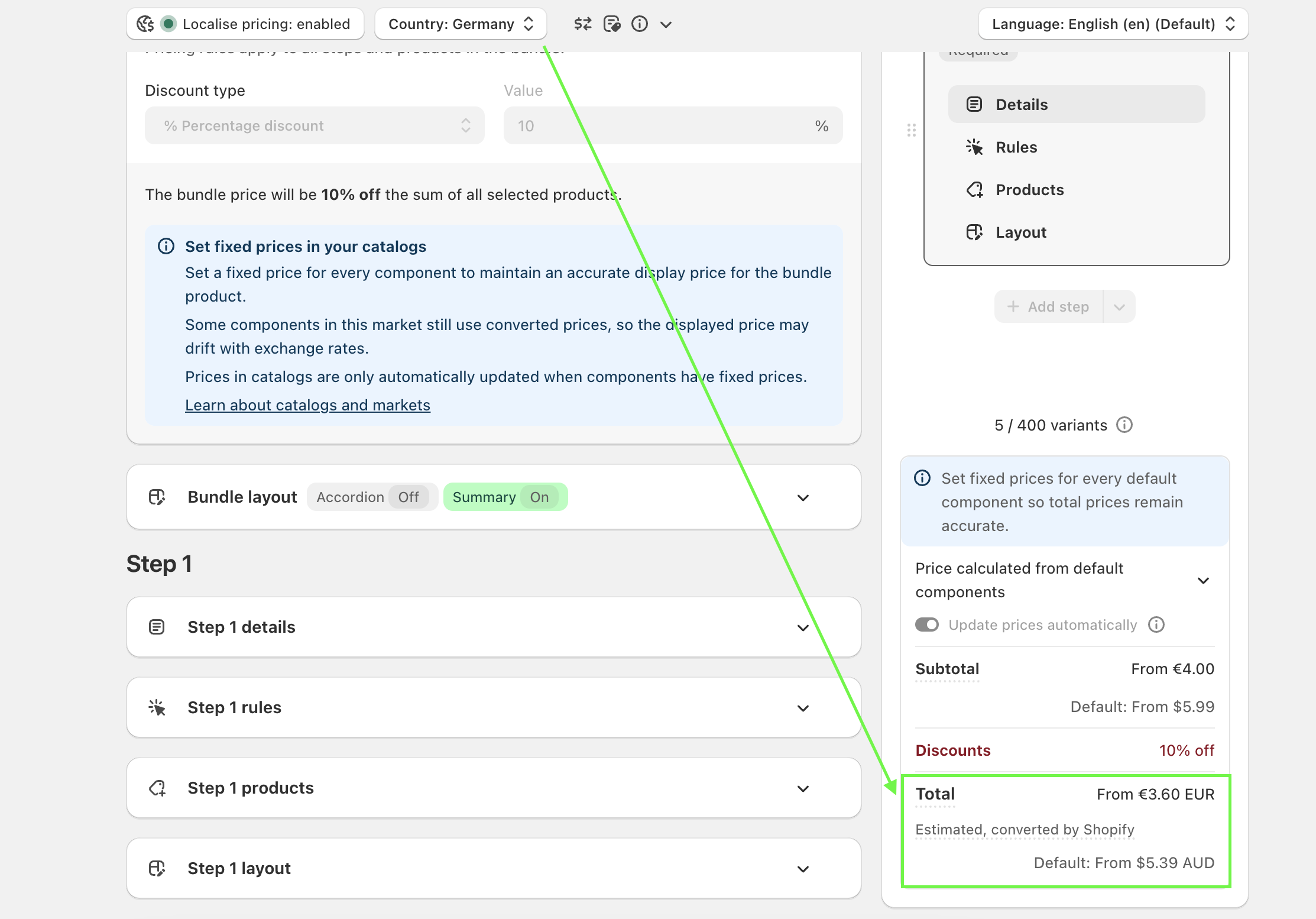
The app writes a catalog price for a bundle only where:
the bundle already has a fixed price in that catalog, or
a default component has a fixed price there and the bundle is published in that market.
Every other catalog keeps Shopify's automatic conversion. Prices you type in the catalog editor are written at save time; the automatic pass runs after the save.
Component product price changes apply within minutes.
Price changes you make inside a catalog apply within a day.
The app also checks every pinned price once a day.
After you save a bundle, a newly pinned market price can take a moment to appear.
Each bundle has an "Update prices automatically" control in the pricing summary. It is on by default.
On: the app keeps the bundle product's base price and all pinned market prices in line with its default component products. If you change a pinned price by hand, the app sets it back on the next update. If you delete one, the app adds it again.
Off: every price belongs to you. Prices will not follow component product price changes in any market. Check your prices after you change component prices or exchange rates move. Customers who build the bundle on your store still pay the component products' current local prices, minus your discount.
Localised bundles work best when every component product has a fixed catalog price in each market. The app can then calculate and maintain the bundle product's price exactly. Shopify's rounding never touches a fixed price. At a minimum, give every default component a fixed price in each catalog; the default components are what the app builds and maintains the bundle's display price from. A mixed market, where some component products are fixed and some are converted, is where prices can become out of date between updates.
Create a catalog for each country or market you sell in.
Turn on Localise pricing, then use the Country selector to choose a country. If the country's market has more than one catalog, pick the catalog you want to price.
Enter the bundle's Fixed price for that catalog, in its currency. Repeat for each country, then Save. That exact price is what customers pay there.
A market without a catalog has no fixed price. Customers there pay Shopify's conversion of your default price.
The app never changes the fixed total prices you set on these bundles.
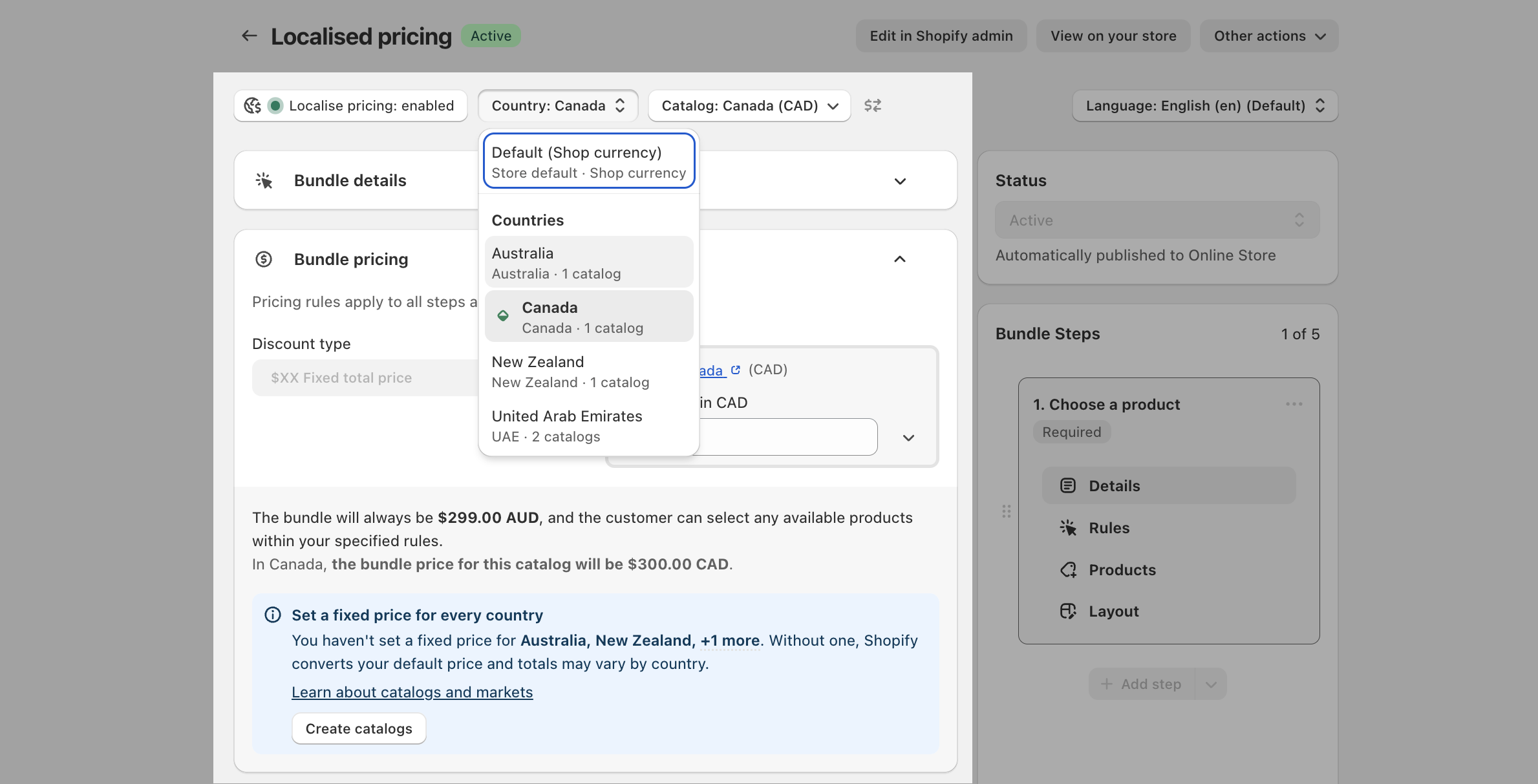
While a country other than Default is selected, most of the bundle's settings are read-only. Switch back to Default to edit the bundle's products, steps, or layout again.
Percent discounts (including volume percent) give the same saving in every market. Use them when you can.
Amount discounts (including volume amount) convert to each market's currency. The exact saving can vary slightly by market.
Sum of products (no extra discount) works in every market.
Fixed total price gives you full manual control per catalog.
Volume discounts with fixed tier prices are not available for localised bundles.
Default component products are what a customer receives when the bundle is added to the cart without selections. The bundle's price in each market is built from them. A default component product must be available in every market where the bundle is sold. Missing products appear greyed out in the default selection window, with a note listing the markets. To use one anyway, first publish it to those markets in Shopify admin, or stop selling the bundle there.
For everything else about defaults, including how to edit them and what happens when one sells out, see Default components.
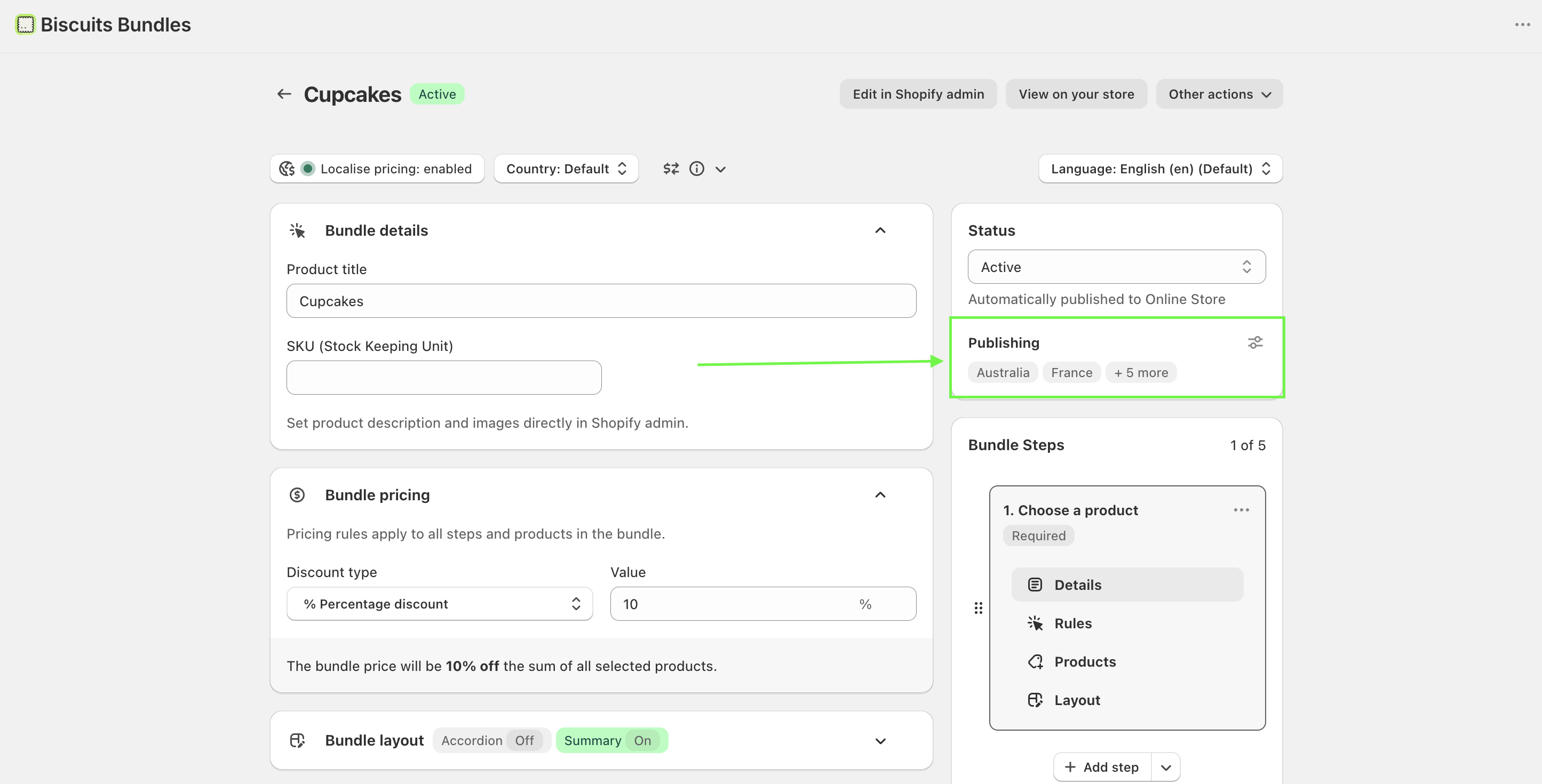
The Status card's Publishing section shows where the bundle product is published. Select Manage to publish or unpublish the bundle against your store's market catalogs, one checkbox per catalog.
A market is served if any of its catalogs carries the bundle product.
A market with no catalog of its own is reached through the Online Store publication instead. An Active bundle is published to the Online Store automatically.
Edit your component products' prices freely. The bundle follows them automatically.
Give component products fixed catalog prices per market whenever you like. The app starts managing the bundle's price in that market within a day, or immediately on your next save.
Compare-at prices you set in catalogs are never changed by the app. The bundle product's own compare-at price updates when you save, unless you tick "Don't update compare-at price" in the pricing summary.
To control the bundle's market prices yourself, turn "Update prices automatically" off first. Otherwise the app overwrites your manual changes on the next update.
The same localisation controls let you translate the bundle's storefront text. Use the Language selector in the bundle editor to switch language; while a language other than the default is selected, only translatable text is editable. Translations apply across countries, and you can delete a language's translations at any time. The number of languages depends on your plan.
These are the small, known cases:
Price rounding. In markets with price rounding, Shopify rounds each component product's price separately. The bundle total is calculated after that rounding, so it does not follow your rounding endings. It can also differ slightly from the converted price on the bundle's product page.
Catalog edits. Price changes made inside a catalog reach pinned bundle prices within a day, not instantly.
Amount discounts. The converted saving can vary slightly by market.
Bundles added outside your store's bundle page. A bundle added through a shared link, a draft order, or the API is charged at the bundle product's own market price, which is the price of its default components. Keeping automatic updates on keeps that price matched to the real bundle total.
Markets the app cannot maintain. The app manages prices in market catalogs only. B2B catalogs and sales channel catalogs are not touched. A market whose catalog has no countries is not maintained.
Markets with a percentage price adjustment. A percentage adjustment is not a fixed price, so the app does not maintain the bundle price there. Shopify adjusts and rounds each product on its own, so the same small rounding difference applies; percent discounts still give the same saving. Give every component a fixed catalog price to remove the difference.
At checkout on your store, the bundle is priced from the live market prices of the component products the customer chose, minus your discount. A displayed price that was briefly out of date does not change what the customer pays.
Turning Localise pricing off removes the per market prices you have set, and the bundle goes back to Shopify's automatic conversion of your default price.
On a fixed total price bundle, all fixed totals across all countries are removed.
On any other localised bundle, per market prices are removed and the bundle is no longer priced as a localised bundle at checkout.
If your plan no longer includes localised pricing, you cannot turn it back on without an upgrade.
You can enable localisation again later; you will need to set your market prices again.